NodeJS Quality
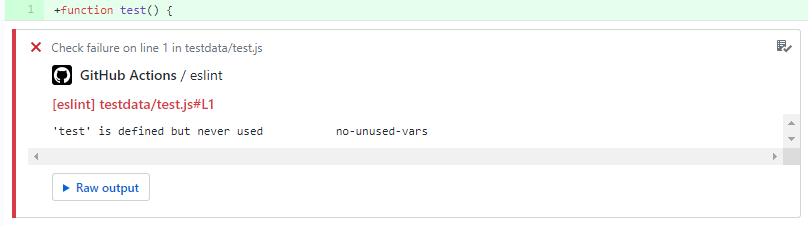
PR comments from ESLint
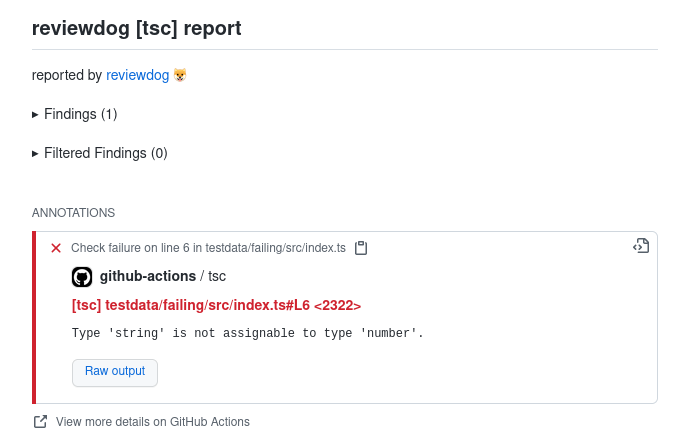
PR comments from TSC
Purpose
This workflow is essentially a quality and style check for a NodeJS project.
It uses ESLint to run checks for problems with your code, prettier to format your code and then a job that will execute your tests. For typescript projects, it will also run the typescript compiler to check for type errors.
Usage
Minimal Example
Below is an example of the minimal configuration required to run the workflow. It's based on sensible defaults but will not satisfy all use cases.
To see how to customise the job(s) to work for your case, refer to inputs, secrets and the Additional examples.
jobs:
  node-quality:
    uses: erzz/toolbox/.github/workflows/node-quality.yml@v1
    # no mandatory inputs
    # no mandatory secrets
Inputs
| Input | Type | Description | Required | Default |
|---|---|---|---|---|
| node-version | string | The version of NodeJS to use | false | 20 |
| install-command | string | Used to override the default command to install your dependencies e.g. yarn install | false | yarn install --silent |
| path | string | Relative path from project root to your node application's source files | false | . |
| eslint-enable | boolean | To disable the eslint job set to false | false | true |
| eslint-command | string | Use to execute a standard ES Lint command (e.g. npm lint:ci) instead of the reviewdog action | false | null |
| eslint-report-path | string | Relative path to any eslint report file(s) you wish to persist as job artifacts (e.g. eslint-report.*) | false | null |
| eslint-flags | string | Provide additional flags to the eslint command | false | . --ext .js,.jsx,.ts,.tsx |
| eslint-reporter | string | Choose the reporter to use for eslint (github-pr-review, github-pr-check, github-check) | false | github-check |
| eslint-level | string | Choose the level of eslint to use (error, warning, info) | false | error |
| eslint-fail-on-error | boolean | To not fail the job on eslint errors set to false | false | true |
| test-enable | boolean | To disable the unit-tests job set to false | false | true |
| test-command | string | Used to override the default command to run your unit tests | false | yarn test:unit-ci |
| coverage-report-enable | boolean | To enable PR coverage report set to true. Requires that the test-command generates a 'coverage/cobertura-coverage.xml' file. | false | false |
| prettier-enable | boolean | To disable the prettier job set to false | false | true |
| prettier-command | string | Used to override the default command to run prettier | false | yarn prettier:ci |
| prettier-commit | boolean | If using the write mode of prettier, you can set to true if you wish to commit the changes back to the repository | false | false |
| tsc-enable | boolean | To disable the tsc job set to false | false | true |
| tsc-flags | string | Provide additional flags to the tsc command | false | null |
| tsc-reporter | string | Choose the reporter to use for tsc (github-pr-review, github-pr-check, github-check) | false | github-check |
| tsc-level | string | Choose the level of tsc to use (error, warning, info) | false | error |
| tsc-fail-on-error | boolean | To not fail the job on tsc errors set to false | false | true |
| artifact-prefix | string | A prefix to apply to the name of the artifacts to upload (useful for matrix builds) | false | null |
Secrets
| Input | Description | Required |
|---|---|---|
| auth-token | Arbitrary token to be exposed as environment variable in the format VARIABLE=value | false |
| auth-token-2 | Arbitrary token to be exposed as environment variable in the format VARIABLE=value | false |
Outputs
| Output | Description | Value |
|---|---|---|
| ref-slug | A URL sanitized version of the github ref | ${{ jobs.lint.outputs.ref-slug }} |
| short-sha | Captures the short SHA for use in this or later workflow jobs | ${{ jobs.lint.outputs.short-sha }} |
Configuration Notes
The workflow itself will not provide the scripts and dependencies. It simply executes your commands and provide artifacts if the appropriate dependencies are installed and configured.
Build authentication
Secrets are provided for build-time authentication with private package registries such as Artifactory, NPM etc.
There are options to provide an auth-token and/or auth-token-2 where the environment variable
they are exposed as is configurable.
For example you could expose auth-token: NPM_TOKEN=${{ secrets.SOME_SECRET }} or
auth-token: ARTIFACTORY_AUTH_TOKEN=${{ secrets.SOME_SECRET }} depending on what your build process
requires.
ESLint
By default the ESLint job utilises an action from reviewdog.
To use your own ESLint script, set the eslint-command input to anything you like (e.g. `yarn lint:ci) and your command will be used instead of reviewdog.
Reviewdog offers different "reporters" to provide feedback on your code. The default reporter is
github-check which works for both push and pull_request events. It provides any findings in
the summary of the workflow as well as in the logs of the job itself.
The github-pr-check works in a similar way, but only for pull_request events.
The final option github-pr-review which provides review comments on the pull request itself. This
is of course only available for pull_request workflows.
Prettier
Executes any prettier command including the option to write the changes back to the files. If you
want the job to commit those changes back to the branch, set the prettier-commit input to true.
Unit Tests
Executes any arbitrary test command(s). If those commands/scripts produce test or coverage reports then they can be published as artifacts. See configuration tips below.
Code Coverage Report as comment in Pull Requests
To get a code coverage report as a comment in the pull request, you can use:
node-quality:
  uses: ingka-group-digital/workflows/.github/workflows/node-quality.yml@v2
  with:
    coverage-report-enable: true
Make sure your test-command actually generates a coverage report, otherwise the job will fail.
Additional Examples
Disable specific jobs
For example, for non-typescript projects you can disable the tsc job:
node-quality:
  uses: erzz/toolbox/.github/workflows/node-quality.yml@v1
  with:
    tsc-enable: false
Custom commands and auth tokens
Most relevant commands are customisable, even with multiple commands using the | syntax. You can
pass in any environment variables you need to the commands for authentication with private package
registries.
node-tests:
  uses: erzz/toolbox/.github/workflows/node-quality.yml@v1
  with:
    install-command: "npm ci"
    test-command: |
      echo "Running tests"
      npm run test
  secrets:
    auth-token: "NPM_TOKEN=${{ secrets.GH_NPM_AUTH_TOKEN }}"
    auth-token-2: "ARTIFACTORY_AUTH_TOKEN=${{ secrets.ARTIFACTORY_AUTH_TOKEN }}"
Tips for Script Configuration
It's difficult to give hard and fast rules about how your node project should be configured, but in order to produce the relevant artifacts something similar to below should be added.
These are just examples! Hopefully you know what to do from there for your special ❄️ snowflake ❄️
ESLint HTML Report
To produce an HTML report in your ESLint test script you would use something like:
"lint:ci": "eslint --ext .js,.ts,.vue . -f node_modules/eslint-html-reporter/reporter.js -o $GITHUB_WORKSPACE/eslint-report.html"
However, some reporters such as the one in the example above will not produce stdout output in the job log if they are sending it to file.
If you wish results to be published in multiple formats such as stdout, html and junit - then a package such as eslint-output works fantastic!
You can see here for an example.
Unit Tests
To produce code coverage and HTML reports in your unit test script, you would use something like:
"test:unit-ci": "jest --selectProjects unit --ci --runInBand --reporters jest-html-reporter jest-junit"
with a jest reporter configuration like:
collectCoverage: true,
  coverageReporters: ['text', 'cobertura'],
  collectCoverageFrom: [
    '<rootDir>/components/**/*.vue',
    '<rootDir>/pages/**/*.vue',
    '<rootDir>/store/**/*.ts',
    '<rootDir>/utils/**/*.ts',
  ],
Workflow details
Source code
name: NodeJS Quality
permissions:
  checks: write
  contents: write
  pull-requests: write
on:
  workflow_call:
    inputs:
      node-version:
        type: string
        description: The version of NodeJS to use
        required: false
        default: "20"
      install-command:
        required: false
        type: string
        description: Used to override the default command to install your dependencies
          e.g. yarn install
        default: yarn install --silent
      path:
        required: false
        type: string
        description: Relative path from project root to your node application's source files
        default: .
      eslint-enable:
        required: false
        type: boolean
        description: To disable the eslint job set to false
        default: true
      eslint-command:
        required: false
        type: string
        description: Use to execute a standard ES Lint command (e.g. npm lint:ci)
          instead of the reviewdog action
      eslint-report-path:
        required: false
        type: string
        description: Relative path to any eslint report file(s) you wish to persist as
          job artifacts (e.g. eslint-report.*)
      eslint-flags:
        required: false
        type: string
        description: Provide additional flags to the eslint command
        default: . --ext .js,.jsx,.ts,.tsx
      eslint-reporter:
        required: false
        type: string
        description: Choose the reporter to use for eslint (github-pr-review,
          github-pr-check, github-check)
        default: github-check
      eslint-level:
        required: false
        type: string
        description: Choose the level of eslint to use (error, warning, info)
        default: error
      eslint-fail-on-error:
        required: false
        type: boolean
        description: To not fail the job on eslint errors set to false
        default: true
      test-enable:
        required: false
        type: boolean
        description: To disable the unit-tests job set to false
        default: true
      test-command:
        required: false
        type: string
        description: Used to override the default command to run your unit tests
        default: yarn test:unit-ci
      coverage-report-enable:
        required: false
        type: boolean
        description: To enable PR coverage report set to true. Requires that the
          test-command generates a 'coverage/cobertura-coverage.xml' file.
        default: false
      prettier-enable:
        required: false
        type: boolean
        description: To disable the prettier job set to false
        default: true
      prettier-command:
        required: false
        type: string
        description: Used to override the default command to run prettier
        default: yarn prettier:ci
      prettier-commit:
        required: false
        type: boolean
        description: If using the write mode of prettier, you can set to true if you
          wish to commit the changes back to the repository
        default: false
      tsc-enable:
        required: false
        type: boolean
        description: To disable the tsc job set to false
        default: true
      tsc-flags:
        required: false
        type: string
        description: Provide additional flags to the tsc command
      tsc-reporter:
        required: false
        type: string
        description: Choose the reporter to use for tsc (github-pr-review,
          github-pr-check, github-check)
        default: github-check
      tsc-level:
        required: false
        type: string
        description: Choose the level of tsc to use (error, warning, info)
        default: error
      tsc-fail-on-error:
        required: false
        type: boolean
        description: To not fail the job on tsc errors set to false
        default: true
      artifact-prefix:
        type: string
        description: A prefix to apply to the name of the artifacts to upload (useful
          for matrix builds)
        required: false
    secrets:
      auth-token:
        required: false
        description: Arbitrary token to be exposed as environment variable in the format
          VARIABLE=value
      auth-token-2:
        required: false
        description: Arbitrary token to be exposed as environment variable in the format
          VARIABLE=value
    outputs:
      ref-slug:
        description: A URL sanitized version of the github ref
        value: ${{ jobs.lint.outputs.ref-slug }}
      short-sha:
        description: Captures the short SHA for use in this or later workflow jobs
        value: ${{ jobs.lint.outputs.short-sha }}
jobs:
  lint:
    name: Lint
    if: ${{ inputs.eslint-enable }}
    runs-on: ubuntu-24.04
    outputs:
      short-sha: ${{ env.GITHUB_SHA_SHORT }}
      ref-slug: ${{ env.GITHUB_REF_SLUG_URL }}
    steps:
      - name: Checkout Source
        uses: actions/checkout@v4
      - name: Slugify github variables
        uses: rlespinasse/github-slug-[email protected]
      - name: Setup NodeJS
        uses: actions/setup-node@v4
        with:
          node-version: ${{ inputs.node-version }}
      - name: Export auth token 1
        env:
          TOKEN: ${{ secrets.auth-token }}
        if: ${{ env.TOKEN != '' }}
        run: |
          echo "::add-mask::${TOKEN#*=}"
          echo "${{ env.TOKEN }}" >> $GITHUB_ENV
      - name: Export auth token 2
        env:
          TOKEN: ${{ secrets.auth-token-2 }}
        if: ${{ env.TOKEN != '' }}
        run: |
          echo "::add-mask::${TOKEN#*=}"
          echo "${{ env.TOKEN }}" >> $GITHUB_ENV
      - name: Install Dependencies
        working-directory: ${{ inputs.path }}
        run: |
          ${{ inputs.install-command }}
      - name: Execute ESLint (command)
        working-directory: ${{ inputs.path }}
        if: ${{ inputs.eslint-command }}
        run: |
          ${{ inputs.eslint-command }}
      - name: Upload artifacts (ES Lint Report)
        uses: actions/upload-artifact@v4
        if: inputs.eslint-command && inputs.eslint-report-path
        with:
          name: ${{ inputs.artifact-prefix }}ES Lint Report
          path: ${{ inputs.eslint-report-path }}
      - name: Execute ESLint (reviewdog)
        if: ${{ !inputs.eslint-command }}
        uses: reviewdog/action-eslint@v1
        with:
          workdir: ${{ inputs.path }}
          github_token: ${{ secrets.GITHUB_TOKEN }}
          reporter: ${{ inputs.eslint-reporter }}
          eslint_flags: ${{ inputs.eslint-flags }}
          level: ${{ inputs.eslint-level }}
          fail_on_error: ${{ inputs.eslint-fail-on-error }}
  prettier:
    name: Prettier
    if: ${{ inputs.prettier-enable }}
    runs-on: ubuntu-24.04
    steps:
      - name: Checkout Source
        uses: actions/checkout@v4
      - name: Setup NodeJS
        uses: actions/setup-node@v4
        with:
          node-version: ${{ inputs.node-version }}
      - name: Export variables
        run: |
          echo "${{ secrets.auth-token }}" >> $GITHUB_ENV
          echo "${{ secrets.auth-token-2 }}" >> $GITHUB_ENV
      - name: Install Dependencies
        working-directory: ${{ inputs.path }}
        run: |
          ${{ inputs.install-command }}
      - name: Prettier
        working-directory: ${{ inputs.path }}
        run: |
          ${{ inputs.prettier-command }}
      - name: Commit prettier changes
        if: ${{ inputs.prettier-commit }}
        uses: EndBug/add-and-commit@v9
        with:
          message: "style: apply prettier formatting"
  tests:
    name: Tests
    runs-on: ubuntu-24.04
    if: ${{ inputs.test-enable }}
    steps:
      - name: Checkout Source
        uses: actions/checkout@v4
      - name: Setup NodeJS
        uses: actions/setup-node@v4
        with:
          node-version: ${{ inputs.node-version }}
      - name: Export variables
        run: |
          echo "${{ secrets.auth-token }}" >> $GITHUB_ENV
          echo "${{ secrets.auth-token-2 }}" >> $GITHUB_ENV
      - name: Install Dependencies
        working-directory: ${{ inputs.path }}
        run: |
          ${{ inputs.install-command }}
      - name: Execute Tests
        working-directory: ${{ inputs.path }}
        run: |
          ${{ inputs.test-command }}
      - name: Generate Coverage Report
        uses: clearlyip/code-coverage-report-action@v5
        id: code_coverage_report_action
        if: inputs.coverage-report-enable && github.actor != 'dependabot[bot]'
        with:
          filename: ${{ inputs.path }}/coverage/cobertura-coverage.xml
          artifact_download_workflow_names: ${{ github.workflow }}
      - name: Add Coverage PR Comment
        uses: marocchino/sticky-pull-request-comment@v2
        if: inputs.coverage-report-enable &&
          steps.code_coverage_report_action.outputs.file != '' &&
          github.event_name == 'pull_request' && (success() || failure())
        with:
          recreate: true
          path: code-coverage-results.md
      - name: Upload Unit Test Reports
        uses: actions/upload-artifact@v4
        if: always()
        with:
          name: ${{ inputs.artifact-prefix }}Unit Test & Coverage Reports
          path: |
            ${{ inputs.path }}/junit.xml
            ${{ inputs.path }}/test-report.html
            ${{ inputs.path }}/coverage/test-report.html
            ${{ inputs.path }}/coverage/cobertura-coverage.xml
  tsc:
    name: TSC
    if: ${{ inputs.tsc-enable }}
    runs-on: ubuntu-24.04
    steps:
      - name: Checkout Source
        uses: actions/checkout@v4
      - name: Slugify github variables
        uses: rlespinasse/github-slug-[email protected]
      - name: Setup NodeJS
        uses: actions/setup-node@v4
        with:
          node-version: ${{ inputs.node-version }}
      - name: Export auth token 1
        env:
          TOKEN: ${{ secrets.auth-token }}
        if: ${{ env.TOKEN != '' }}
        run: |
          echo "::add-mask::${TOKEN#*=}"
          echo "${{ env.TOKEN }}" >> $GITHUB_ENV
      - name: Export auth token 2
        env:
          TOKEN: ${{ secrets.auth-token-2 }}
        if: ${{ env.TOKEN != '' }}
        run: |
          echo "::add-mask::${TOKEN#*=}"
          echo "${{ env.TOKEN }}" >> $GITHUB_ENV
      - name: Install Dependencies
        working-directory: ${{ inputs.path }}
        run: |
          ${{ inputs.install-command }}
      - name: Execute TSC
        uses: EPMatt/reviewdog-action-tsc@v1
        with:
          workdir: ${{ inputs.path }}
          github_token: ${{ secrets.GITHUB_TOKEN }}
          reporter: ${{ inputs.tsc-reporter }}
          tsc_flags: ${{ inputs.tsc-flags }}
          level: ${{ inputs.tsc-level }}
          fail_on_error: ${{ inputs.tsc-fail-on-error }}
Job definitions
| Step | Uses | Conditional |
|---|---|---|
| Checkout Source | actions/checkout@v4 | false |
| Slugify github variables | rlespinasse/[email protected] | false |
| Setup NodeJS | actions/setup-node@v4 | false |
| Export auth token 1 | script | true |
| Export auth token 2 | script | true |
| Install Dependencies | script | false |
| Execute ESLint (command) | script | true |
| Upload artifacts (ES Lint Report) | actions/upload-artifact@v4 | true |
| Execute ESLint (reviewdog) | reviewdog/action-eslint@v1 | true |
| Step | Uses | Conditional |
|---|---|---|
| Checkout Source | actions/checkout@v4 | false |
| Setup NodeJS | actions/setup-node@v4 | false |
| Export variables | script | false |
| Install Dependencies | script | false |
| Prettier | script | false |
| Commit prettier changes | EndBug/add-and-commit@v9 | true |
| Step | Uses | Conditional |
|---|---|---|
| Checkout Source | actions/checkout@v4 | false |
| Setup NodeJS | actions/setup-node@v4 | false |
| Export variables | script | false |
| Install Dependencies | script | false |
| Execute Tests | script | false |
| Generate Coverage Report | clearlyip/code-coverage-report-action@v5 | true |
| Add Coverage PR Comment | marocchino/sticky-pull-request-comment@v2 | true |
| Upload Unit Test Reports | actions/upload-artifact@v4 | true |
| Step | Uses | Conditional |
|---|---|---|
| Checkout Source | actions/checkout@v4 | false |
| Slugify github variables | rlespinasse/[email protected] | false |
| Setup NodeJS | actions/setup-node@v4 | false |
| Export auth token 1 | script | true |
| Export auth token 2 | script | true |
| Install Dependencies | script | false |
| Execute TSC | EPMatt/reviewdog-action-tsc@v1 | false |